> ## Documentation Index
> Fetch the complete documentation index at: https://daily-ms-ws-body-url-encode.mintlify.site/llms.txt
> Use this file to discover all available pages before exploring further.
# Pipecat Cloud & Pipecat Enterprise
> Run Pipecat agents in production: Pipecat Cloud in Daily-hosted regions, or Pipecat Enterprise with a self-hosted region in your VPC.
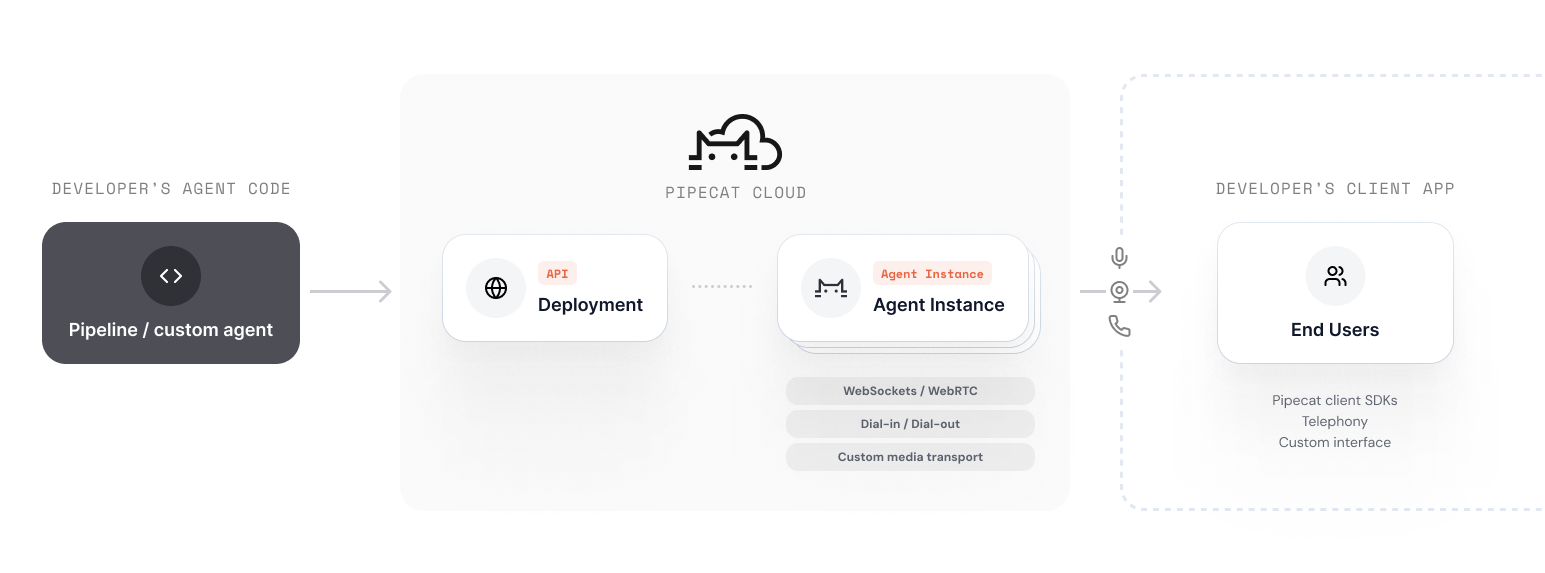
Pipecat Cloud is the platform for running Pipecat agents in production. You bring an agent image; it handles deploys, session starts, scaling, and observability. It comes in two deployment models that share one control plane and differ in where your agents run.
 ## Two ways to run
**Multi-tenant and fully managed.** Your agents run in Daily-hosted regions
and Daily operates everything. Sign up and deploy in minutes.
**Single-tenant and hybrid.** Your agents run in a self-hosted region — a
Kubernetes cluster in your VPC.
| | Pipecat Cloud | Pipecat Enterprise |
| - | - | - |
| Where agents run | Daily-hosted regions in the US, Europe, and India | A Kubernetes cluster you operate |
| Who operates the infrastructure | Daily | You run the cluster; Daily runs the control plane |
| Where secrets and logs are stored | Pipecat Cloud | Your cluster; secret values never leave it |
| Getting access | [Sign up](https://pipecat.daily.co) | Enabled per organization — [contact sales](https://www.daily.co/contact/sales) |
The [Pipecat Enterprise overview](/pipecat-cloud/enterprise/overview) has the
full comparison, and [Architecture](/pipecat-cloud/enterprise/architecture)
explains how the control plane and data plane divide the work.
## Start on Cloud, grow into Enterprise
Pipecat Cloud and Pipecat Enterprise are one platform. Start on Cloud and move agents to a self-hosted region when data residency, network placement, or scale calls for it. Your image, deploy workflow, and session code carry over unchanged, and you can run agents in both.
What stays the same:
* **Agent images**: The same image format, pulled from any container registry. See [Agent Images](/pipecat-cloud/fundamentals/agent-images).
* **Deploys**: `pipecat cloud deploy`, the dashboard, or `pcc-deploy.toml`, with a region chosen per agent. See [Deployments](/pipecat-cloud/fundamentals/deploy).
* **Sessions**: The same [REST API](/api-reference/pipecat-cloud/rest-reference/overview) and [Python SDK](/api-reference/pipecat-cloud/sdk-reference/overview) on any transport — Daily WebRTC, WebSocket, or telephony.
* **Scaling**: `min_agents` and `max_agents`, scaling from zero with session demand. See [Scaling](/pipecat-cloud/fundamentals/scaling).
* **Secrets**: Agents reference secret sets by name. In a self-hosted region, the values live in your cluster. See [Secrets](/pipecat-cloud/fundamentals/secrets).
* **Observability**: Sessions, per-session CPU and memory metrics, and agent logs in the dashboard, CLI, and API. In a self-hosted region, logs are stored in your own log store, which is optional.
What changes is where things live: secret values move into your cluster, you set agent sizing yourself, and WebSocket and telephony traffic connects to your region's own endpoint. The [Pipecat Enterprise overview](/pipecat-cloud/enterprise/overview#what-changes) lists every difference.
## How it works
Write a Pipecat pipeline as you normally would, using any supported services.
Install the Pipecat CLI with the Pipecat Cloud plugin:
```bash theme={null}
uv tool install "pipecat-ai[cli]" --with pipecatcloud
```
Build and deploy your agent image to a region — Daily-hosted or your own.
```bash theme={null}
pipecat cloud deploy
```
Use the REST API or Python SDK to start agent sessions on demand.
```bash theme={null}
curl --request POST \
--url https://api.pipecat.daily.co/v1/public/{agentName}/start \
--header 'Authorization: Bearer ' \
--header 'Content-Type: application/json'
```
## Pricing
Pipecat Cloud uses usage-based pricing. See the [pricing page](https://www.daily.co/pricing/pipecat-cloud) for current rates and a calculator to estimate your total cost per minute, including third-party AI services.
Pipecat Enterprise is billed under your enterprise agreement; agent-minutes in self-hosted regions are not metered by agent profile. [Contact sales](https://www.daily.co/contact/sales) for details.
## Next steps
Get your account set up and ready to deploy your first agent.
Deploy the quickstart agent to Pipecat Cloud.
What you operate in a self-hosted region, and how to get started.
## Two ways to run
**Multi-tenant and fully managed.** Your agents run in Daily-hosted regions
and Daily operates everything. Sign up and deploy in minutes.
**Single-tenant and hybrid.** Your agents run in a self-hosted region — a
Kubernetes cluster in your VPC.
| | Pipecat Cloud | Pipecat Enterprise |
| - | - | - |
| Where agents run | Daily-hosted regions in the US, Europe, and India | A Kubernetes cluster you operate |
| Who operates the infrastructure | Daily | You run the cluster; Daily runs the control plane |
| Where secrets and logs are stored | Pipecat Cloud | Your cluster; secret values never leave it |
| Getting access | [Sign up](https://pipecat.daily.co) | Enabled per organization — [contact sales](https://www.daily.co/contact/sales) |
The [Pipecat Enterprise overview](/pipecat-cloud/enterprise/overview) has the
full comparison, and [Architecture](/pipecat-cloud/enterprise/architecture)
explains how the control plane and data plane divide the work.
## Start on Cloud, grow into Enterprise
Pipecat Cloud and Pipecat Enterprise are one platform. Start on Cloud and move agents to a self-hosted region when data residency, network placement, or scale calls for it. Your image, deploy workflow, and session code carry over unchanged, and you can run agents in both.
What stays the same:
* **Agent images**: The same image format, pulled from any container registry. See [Agent Images](/pipecat-cloud/fundamentals/agent-images).
* **Deploys**: `pipecat cloud deploy`, the dashboard, or `pcc-deploy.toml`, with a region chosen per agent. See [Deployments](/pipecat-cloud/fundamentals/deploy).
* **Sessions**: The same [REST API](/api-reference/pipecat-cloud/rest-reference/overview) and [Python SDK](/api-reference/pipecat-cloud/sdk-reference/overview) on any transport — Daily WebRTC, WebSocket, or telephony.
* **Scaling**: `min_agents` and `max_agents`, scaling from zero with session demand. See [Scaling](/pipecat-cloud/fundamentals/scaling).
* **Secrets**: Agents reference secret sets by name. In a self-hosted region, the values live in your cluster. See [Secrets](/pipecat-cloud/fundamentals/secrets).
* **Observability**: Sessions, per-session CPU and memory metrics, and agent logs in the dashboard, CLI, and API. In a self-hosted region, logs are stored in your own log store, which is optional.
What changes is where things live: secret values move into your cluster, you set agent sizing yourself, and WebSocket and telephony traffic connects to your region's own endpoint. The [Pipecat Enterprise overview](/pipecat-cloud/enterprise/overview#what-changes) lists every difference.
## How it works
Write a Pipecat pipeline as you normally would, using any supported services.
Install the Pipecat CLI with the Pipecat Cloud plugin:
```bash theme={null}
uv tool install "pipecat-ai[cli]" --with pipecatcloud
```
Build and deploy your agent image to a region — Daily-hosted or your own.
```bash theme={null}
pipecat cloud deploy
```
Use the REST API or Python SDK to start agent sessions on demand.
```bash theme={null}
curl --request POST \
--url https://api.pipecat.daily.co/v1/public/{agentName}/start \
--header 'Authorization: Bearer ' \
--header 'Content-Type: application/json'
```
## Pricing
Pipecat Cloud uses usage-based pricing. See the [pricing page](https://www.daily.co/pricing/pipecat-cloud) for current rates and a calculator to estimate your total cost per minute, including third-party AI services.
Pipecat Enterprise is billed under your enterprise agreement; agent-minutes in self-hosted regions are not metered by agent profile. [Contact sales](https://www.daily.co/contact/sales) for details.
## Next steps
Get your account set up and ready to deploy your first agent.
Deploy the quickstart agent to Pipecat Cloud.
What you operate in a self-hosted region, and how to get started.